ScienceBasedKids.com may earn a commission from affiliate links in this article. Our ratings are never influenced by affiliate relationships. Read our full methodology.
Editorial Note
This article draws on our Botley 2.0 Coding Robot review, Cubetto Coding Robot review, Coding Critters review, and a March 2026 evaluation of Sphero Mini based on published specifications and aggregated user feedback. Our Sphero assessment is not yet based on first-hand multi-week testing; that review is in progress.
The Short Answer
| Age | Top Pick | Second Pick |
|---|---|---|
| 3–6 | Cubetto ($225) | Coding Critters ($40) |
| 5–8 | Botley 2.0 ($65) | Coding Critters ($40) |
| 8–12 | Botley 2.0 ($65) | Sphero Mini ($50) — different use case |
| 10+ (serious) | Skip to LEGO SPIKE Essential ($290) or Arduino kit | — |
The Real Coding Skills Kids Learn
A “coding robot” teaches different things at different ages:
Ages 3–6: Sequencing
A young child learns that putting blocks/commands in a specific order produces a specific outcome. “Forward, forward, left turn” is a sequence. The transferable skill is understanding that order matters — the foundation for later procedural thinking.
Ages 5–9: Debugging
The robot doesn’t do what the child expected. Why? Maybe wrong command, maybe wrong order, maybe wrong turn angle. The child investigates and adjusts. This is the transferable skill — not the specific syntax, but the “things don’t work the first time; let’s figure out why” mental model.
Ages 8–14: Algorithm Design
A child starts designing solutions: “How do I make the robot navigate this obstacle course?” Multi-step planning, conditional logic, loops. This is where real programming skills take root.
The key: the robot’s specific design determines which of these skills it actually teaches. A robot that works perfectly every time doesn’t teach debugging. A robot with purely drag-and-drop instructions doesn’t teach algorithm design.
The Picks
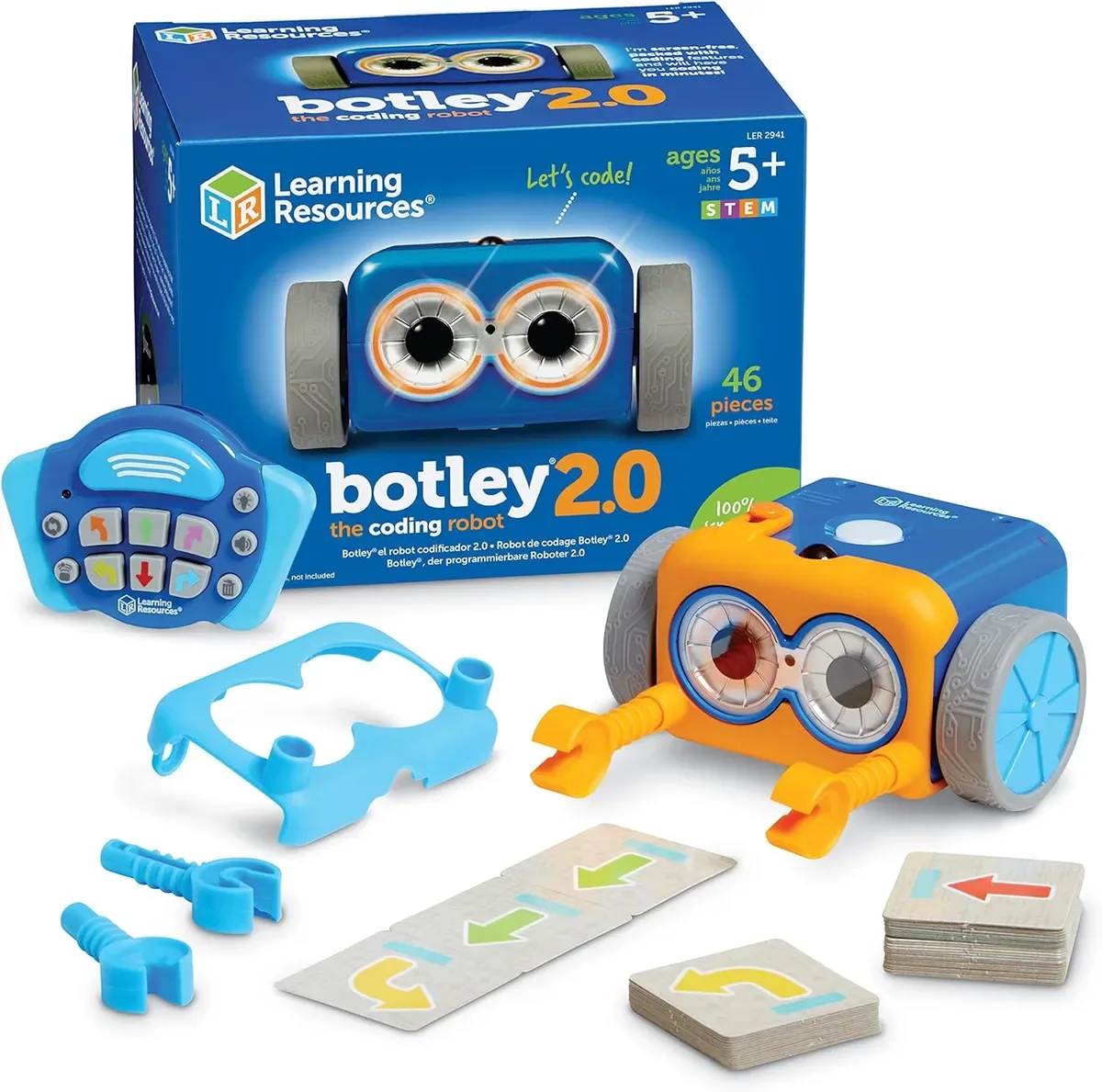
1. Botley 2.0 Coding Robot — $65 — Our Top Screen-Free Pick
A child programs Botley with a remote-style controller (no app, no tablet required). Commands include forward/backward/turn/loop. Includes 78 accessory pieces (cones, ramps, obstacles) for building challenges.
Why it wins: The cleanest screen-free coding robot on the market. A child can sit on the living room floor and program Botley without parent involvement. The remote controller’s command buttons give genuine practice with sequencing and debugging — if the robot doesn’t do what the child expected, they investigate why and re-enter the sequence.
Limitations: The activity accessories in the base kit get repetitive after 2–3 months. An expansion pack ($20–$30) keeps engagement going. Loop-and-if-then programming is introductory; a motivated 10-year-old outgrows Botley within a year.
Best age: 5–9. Sweet spot is 6–8.
2. Cubetto Coding Robot — $225 — Premium Montessori Pick
A wooden robot programmed by placing physical programming blocks on a physical board. No screen, no remote, no electricity required for the input (blocks and board are wooden and magnet-free — physical block placement is the programming).
Why it wins: Perfect Montessori-philosophy fit. The tactile programming with wooden blocks matches how 3–6-year-olds learn best. Screen-free in the strictest sense. Durable to heirloom quality.
Limitations: $225 is a lot. At age 6–7, Cubetto starts feeling below the child’s capacity — Cubetto is best used at 3–6 and then set aside or handed down to younger siblings.
Best age: 3–6. Sweet spot is 4–5.
3. Coding Critters — $40 — Budget Screen-Free
Plush pet-character robots programmed with button sequences on the character itself. Cheaper than Botley, younger age fit (4–6).
Why it’s on the list: Budget-friendly entry to screen-free coding. The pet-character appeal works for ages 4–6 who wouldn’t engage with Botley’s more abstract design.
Limitations: Simpler command set than Botley. Better suited for introducing sequencing than for real debugging practice. Expand to Botley when the child outgrows the pet-character framing.
4. Sphero Mini — $50 — App-Based Option
A ball-shaped rolling robot controlled via smartphone app. The app progresses through drag-and-drop programming to JavaScript at higher levels.
Why it’s here: For ages 8+ in a household comfortable with screen-time, Sphero Mini delivers more advanced programming progression than Botley. Javascript-level programming at age 10+ is meaningful.
Limitations: Requires smartphone or tablet — see our Screen-Free STEM Kit Audit for context. For families prioritizing screen-free play, skip. The rolling-ball form factor is less versatile than Botley for building obstacle courses.
Best age: 8–14.
5. LEGO SPIKE Essential — $290 — The Serious Step-Up
Technically a “coding robot” at the high end. Real sensors and motors, block-based coding that extends to Python for older kids. Requires iPad/computer for programming.
Why it’s on this list: For kids 9+ who’ve outgrown Botley and want substantive programming, LEGO SPIKE is the right next step. It’s also the serious investment for families committing to multi-year STEM engagement.
Limitations: App-dependent (see Screen-Free STEM Kit Audit). Expensive. Multi-hour setup for first use.
What to Avoid
- Coding robots under $40 marketed as app-controlled. Typically knockoffs with poor motor quality, unreliable connections, and frustrating user experience.
- “Smart toys” with limited programming depth. Some marketed coding robots actually do 4-5 pre-loaded patterns and can’t be meaningfully programmed. Read reviews for actual programming capability.
- Character-branded coding robots (PJ Masks, Paw Patrol, etc.). The licensing premium doesn’t improve the coding capability.
- Remote-controlled toy cars called “coding robots.” A remote car with programmable turn sequences is a toy, not a coding introduction.
- Generic “STEM” brands. Stick to Learning Resources, Primo Toys (Cubetto), Sphero, and LEGO for reliable products.
Feature Comparison
| Botley 2.0 | Cubetto | Coding Critters | Sphero Mini | LEGO SPIKE Essential | |
|---|---|---|---|---|---|
| Price | $65 | $225 | $40 | $50 | $290 |
| Age range | 5–9 | 3–6 | 4–6 | 8–14 | 8+ |
| Screen required | No | No | No | Yes (app) | Yes (app + tablet) |
| Programming input | Remote controller | Wooden blocks on board | Character buttons | App | App |
| Command depth | Sequence + simple loop | Sequence | Sequence | Drag-drop → JavaScript | Blocks → Python |
| Debug opportunity | Strong | Moderate | Light | Strong | Strong |
| Build expandability | Yes (add accessories) | Limited | Limited | No | Extensive |
| Our review rating | 6/10 | 7/10 | 6/10 | N/A (no full review) | 7/10 |
Common Parent Questions
Will this really teach my kid to code? Not in the “write production software” sense. But it will teach sequencing, debugging, and algorithmic thinking — which are the underlying skills that real programming requires. The specific syntax (Python, JavaScript, etc.) is easier to learn later if the underlying mental models are already in place.
Is a coding robot better than an app? For ages 3–8, yes — the embodied cognition research suggests that physical interaction supports deeper learning than screen-only programming at early ages. For 8+, both can work; it depends on the specific product’s quality.
What about graphical coding like Scratch? Scratch is excellent and free (scratch.mit.edu). It pairs well with a coding robot — the robot teaches what code does physically; Scratch teaches what code does virtually. A kid using both ends up understanding programming faster than a kid using only one.
How long will my kid engage? Median engagement patterns:
- Botley: 3–6 months of primary use, occasional return-engagement after that
- Cubetto: 1–3 years at the 3–6 age band (grows with the child)
- Coding Critters: 2–4 months primary use
- Sphero Mini: 6 months if kid engages with the app progression
- LEGO SPIKE Essential: 2–3 years sustained
The Bottom Line
For screen-free households, ages 5–8: Botley 2.0 at $65. Clear winner for this combination.
For Montessori-philosophy families, ages 3–6: Cubetto at $225. Premium but multi-year value.
For ages 8+ with some screen tolerance: Sphero Mini ($50) or LEGO SPIKE Essential ($290) depending on budget and engineering depth desired.
Budget pick, ages 4–6: Coding Critters at $40. Character-friendly entry point.
For serious pre-coding education, age 10+: Skip the kid-coding-robot category entirely. Get a real Arduino kit ($85–$110) or LEGO SPIKE Essential ($290). The content ceiling is dramatically higher.
Every product recommended has been reviewed in depth by our team, with the exception of Sphero Mini where our analysis is based on published specifications and aggregated user feedback.